


FAQ
Help & FAQs
Category
 Overview of the Registration Process for Baby-J
- How to Photograph Your Identity Verification Document
【英語】登録
Overview of the Registration Process for Baby-J
To be active on Baby-J, please complete the Sitter/Tutor registration.
Follow the steps below to register. There is no registration fee.
【Registration Flow】
■ Site Registration
・Email address verification
・Entry of basic information
・Entry of work history and skills
※ Qualifications, trainings, and courses should be registered here. Please prepare your certificates.
・Upload of required documents
※ Identity document, résumé, and work history (CV) should be uploaded here. Please have them ready.
※ For details, please refer to “About Identity Verification Documents.”
・Entry of babysitting details / tutoring subjects & methods
↓
■ Document Screening
We will confirm whether you meet the application requirements and conduct identity verification.
↓
■ Interview
During the interview, we will ask about your background and skills, and confirm the physical and mental health conditions necessary for working as a babysitter or tutor.
(Depending on the interview results, you may not be able to work through Baby-J. We appreciate your understanding.)
↓
Registration Completed
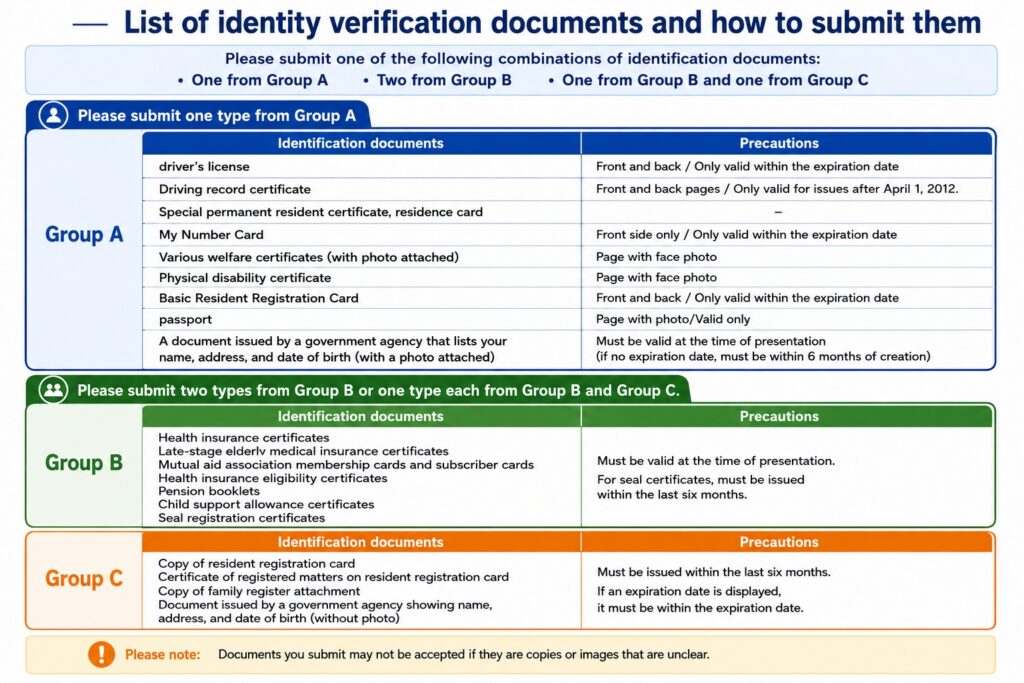
Regarding Identity Verification Documents
Please register one of the following documents as proof of identity, confirming your name, address, and date of birth.
Documents acceptable with a single submission:
Driver’s License, My Number Card, etc.
Documents acceptable with two submissions:
Passport + Certificate of Residence,
Health Insurance Card + Certificate of Residence, etc.
How to Photograph Your Identity Verification Document
Shooting Tips
・ Ensure that both the front and back are fully visible and in focus (text must be legible).
・ If possible, take the photo on a dark-colored background.
If You Have Forgotten Your Login Password
Please select “Forgot your password?” on the login screen and proceed to reset your password.
If You Are Not Receiving Emails
■ About spam/junk mail settings
There is a possibility that the email for address verification has been sorted into your spam/junk folder.
Please kindly check your spam/junk folder.
■ About safe-sender/whitelist settings
When Baby-J sends the email address verification message, it is sent from the address below.
Please try adding the following address to your allowed/safe-sender list.
▼ Email address used for verification
noreply@baby-j.site
About Registering and Updating Your Payout Account Information
To receive your remuneration, please register your bank account information in advance.
■ Account Registration
My Page > Payout Account > Enter your account details and complete registration.
■ Account Changes
My Page > Payout Account > Enter the items you wish to change and update.
Regarding Your Profile Photo
This photo will be displayed to guardians when they are searching for a sitter.
To ensure trust and confidence, please upload a clear photo in which your face is easily recognizable.
・Photos showing the face of anyone other than yourself
(This includes your own children if their faces are visible.)
・Photos where your face is not clearly visible
・Photos where you are wearing a mask
・Photos with multiple people
・Photos containing copyrighted or well-known characters
Prohibition of Multiple Account Registrations
At Baby-J, we strictly comply with the “Guidelines for Matching Websites for Child Care Services.”
Under these guidelines, it is prohibited for a single sitter to register under multiple names. To prevent duplicate registrations, we have reinforced our administrative controls within the system.
Please observe the Terms and use the service in the proper manner.
Begin Your Journey with Complimentary Membership
Explore Detailed Profiles of Our Curated Babysitters and Tutors, and Easily Make Reservations.

Join us
Interested in Becoming a Babysitter or Tutor?
We Are Inviting Applications for Elite Babysitters and Tutors at Baby-J.
We Seek Individuals of Distinction and Experience Who Can Contribute to the Growth of Children.